Skip to content

Arts & entertainment.

Publish events, creative work, schedules and visitor information.
Performance rehearsal and production equipment in a theatre
HEAVENKEYS / INDUSTRY

Digital work built around your industry.

Websites, applications and connected workflows shaped around your customers, your team and the information you maintain.

Discuss your project ↗
Your context matters
We can build event listings, artist or venue pages and content publishing tools. Schedules, booking links, venue details and access information help visitors plan their visit.
Connected capabilities

What we can build for arts & entertainment.

Event and programme management
Schedules and venue changes are duplicated across several channels.

What we can build: We can build event records with approval, recurring performance instances and visible cancellation states, connected to the selected publishing and booking tools.

Audience and booking journeys
Visitors cannot find the correct performance or practical arrival information.

What we can build: Event pages can link to the exact ticket-provider performance and approved venue instructions. Booking clicks remain distinct from completed ticket sales.

Production issue tracking
Equipment problems and venue tasks are reported without evidence or ownership.

What we can build: A production workspace can accept location-linked issues with photographs or permitted videos, assign responsible staff and show investigation, scheduled work and completion stages.

AI programme assistant
Audience questions and content updates consume organiser time.

What we can build: An assistant can answer from approved schedules and venue guidance, draft announcements and flag missing event details. Staff approve publication, credits and schedule changes.

Media library and rights workflow
Teams cannot tell which promotional assets are cleared for publication.

What we can build: An asset library can store approved credits, permitted uses and release dates, with review states and controlled access to unpublished files.

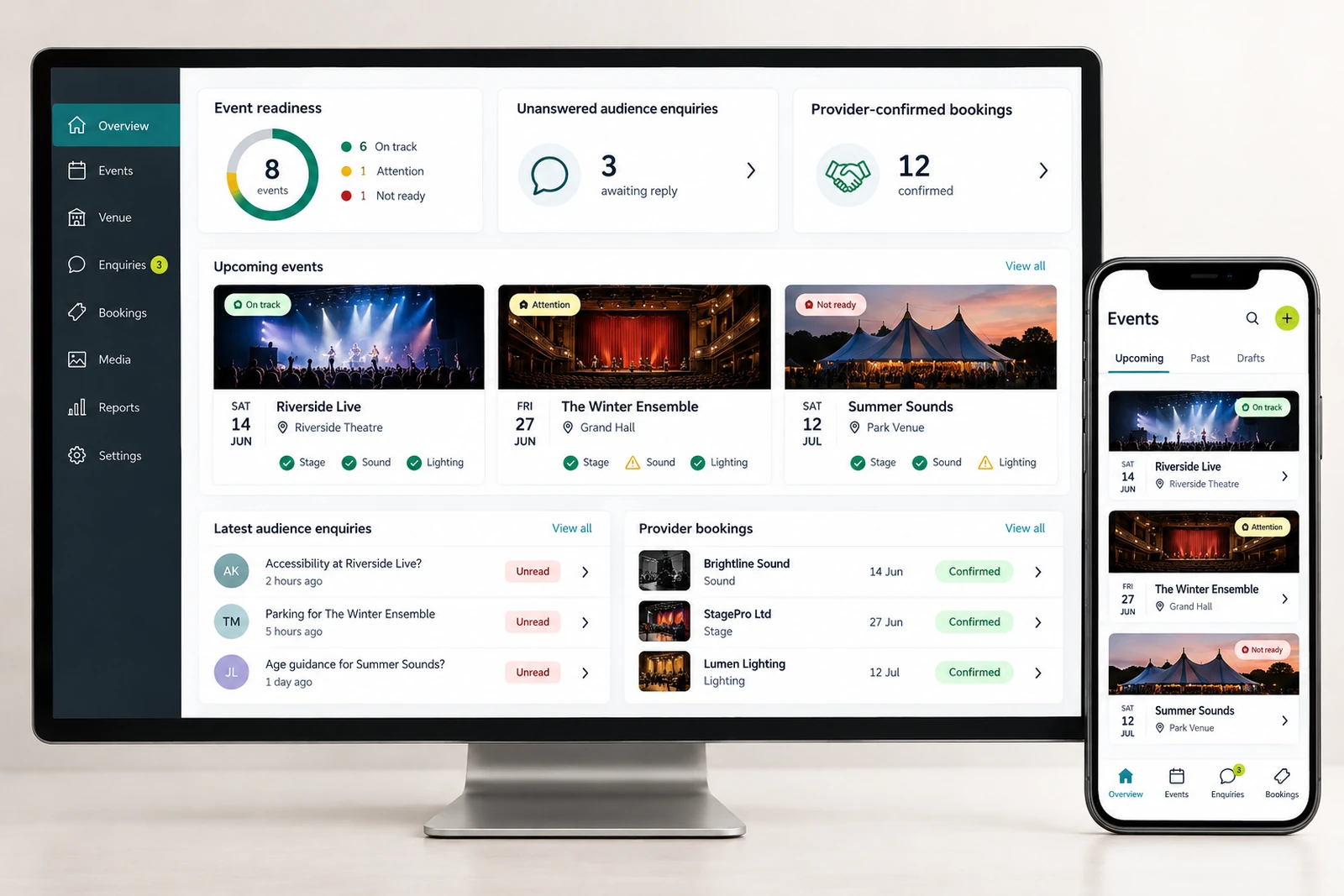
Organiser reporting
Managers lack a view of open production tasks and booking-provider exceptions.

What we can build: A dashboard can show event readiness, unanswered audience enquiries and provider-confirmed booking summaries without implying unverified attendance or revenue.

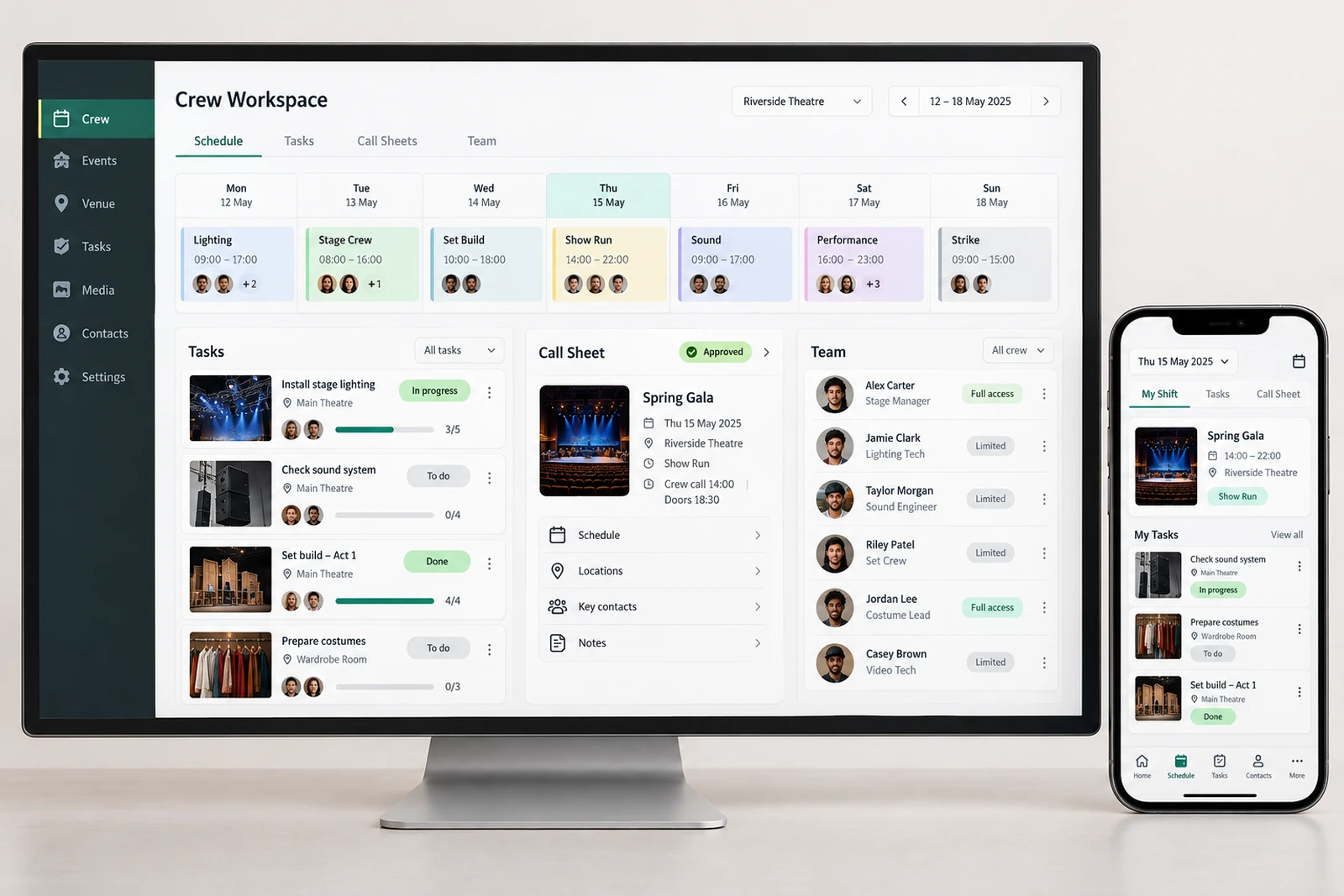
Crew scheduling and task ownership
Production responsibilities are unclear when schedules change.

What we can build: A crew workspace can organise shifts, assigned tasks and approved call-sheet updates with controlled access to personal contact details.

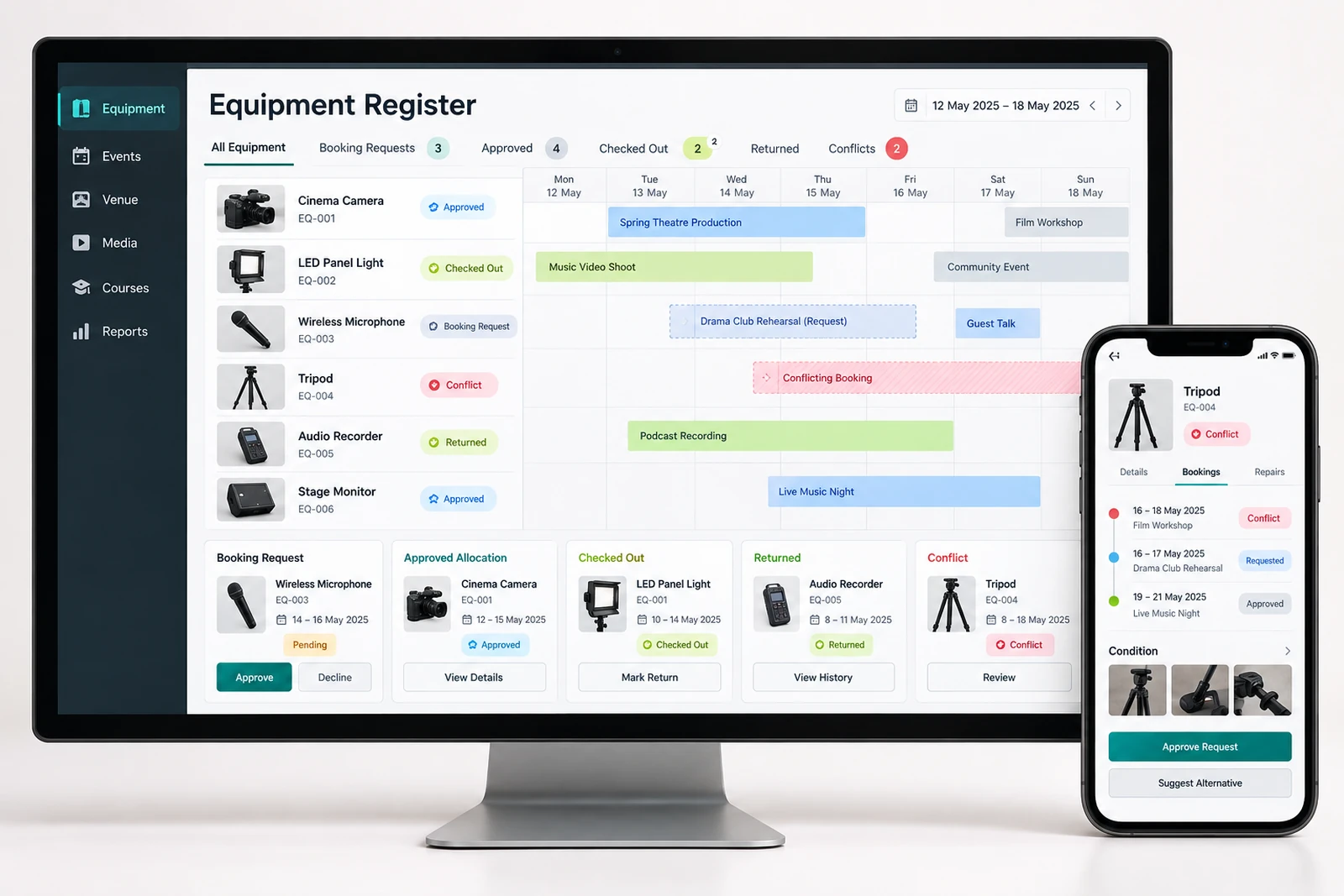
Equipment and asset bookings
Teams reserve the same equipment or lose track of returns.

What we can build: An equipment register can show booking requests, approved allocation, checkout and return states, with conflicts surfaced for staff review.

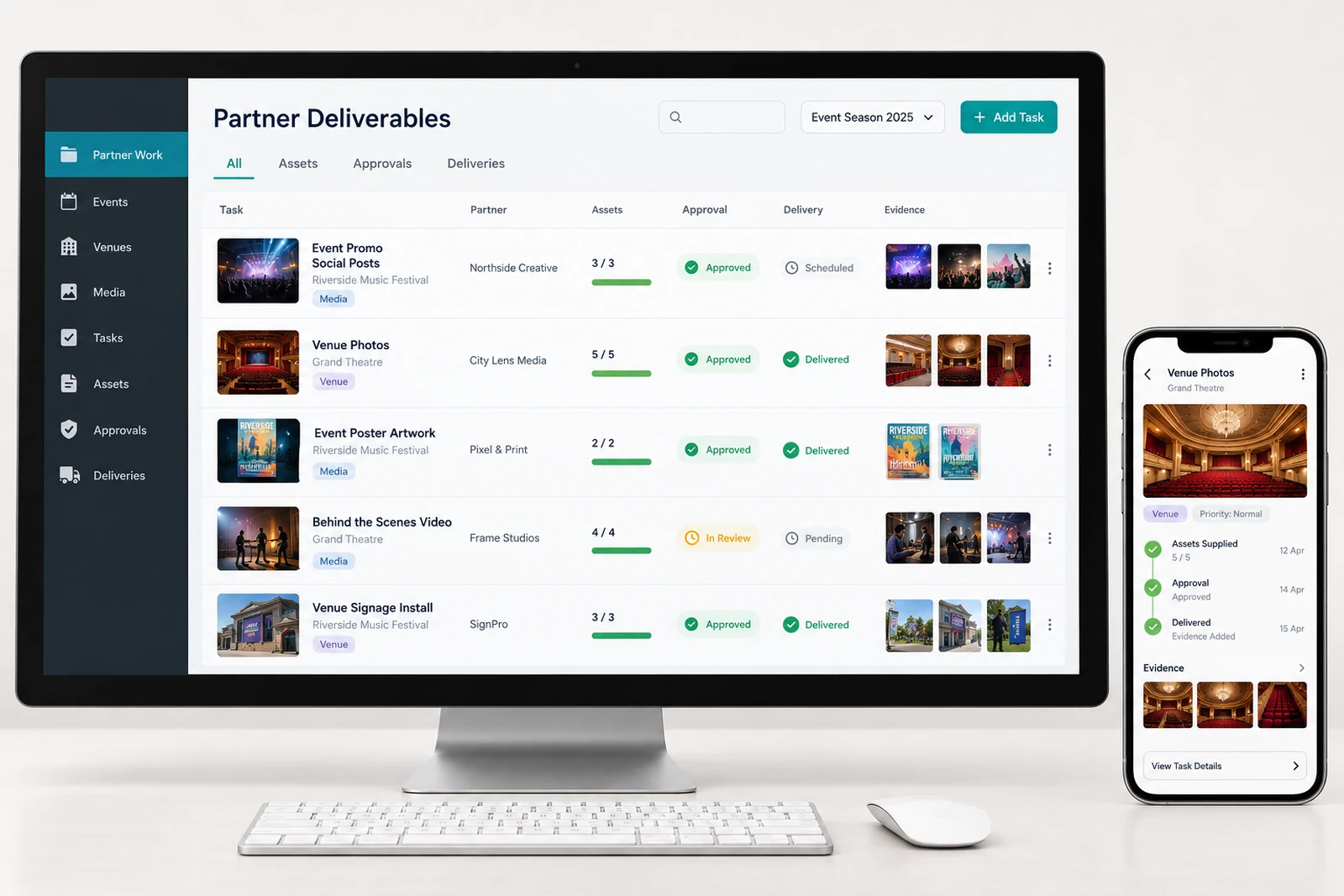
Sponsor and partner deliverables
Approved promotional commitments are difficult to coordinate.

What we can build: A partner workflow can track supplied assets, publication approvals and delivery evidence against agreed tasks without inventing audience results.

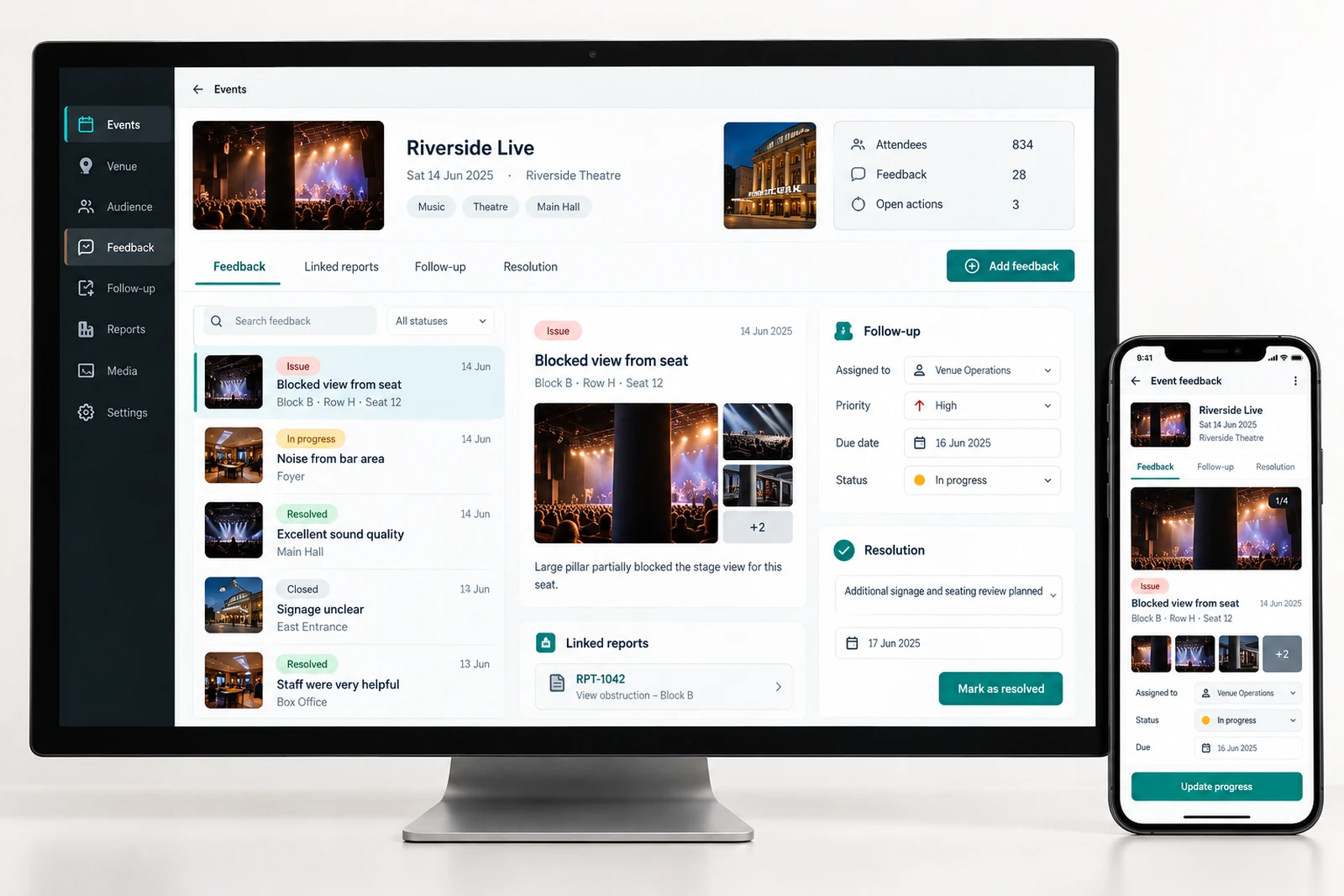
Event feedback and follow-up
Audience issues disappear after an event ends.

What we can build: A feedback workspace can link reports to the event, assign follow-up and record a resolution. Personal evidence remains restricted to authorised staff.

Conflicting event details across channels
An event may have the correct details on the organiser's website and a different time on a partner listing, a social post or a downloadable programme.

What we can build: We can build a distribution register for the event's public channels.

Cancellation and postponement communication
A cancellation creates several different questions at once: whether the whole series is affected, what happens to existing tickets and where attendees can ask for help.

What we can build: We can design a controlled event-change workflow with separate cancellation, postponement and rescheduling states.

Refund request status
A customer can send a refund request and then contact several teams because they cannot tell whether it was received.

What we can build: We can create a refund enquiry tracker that records the purchase reference, event, request reason and responsible team.

Waitlist and capacity management
A sold-out event may keep a waiting list in a form that is disconnected from actual ticket availability.

What we can build: We can build a waitlist process that distinguishes joining the queue, receiving an offer, holding an allocation and confirming through the ticket provider.

Accessible audience information
A visitor planning an accessible visit may find a general statement about inclusivity but no practical information about entrances, seating arrangements or how to discuss individual requirements.

What we can build: We can create an accessible information structure with venue-specific details, clearly dated updates and a respectful enquiry route.

Entry scanning when connectivity fails
An entry queue can stop when the device cannot reach the ticketing service.

What we can build: We can help design an entry workflow around the authorised ticketing provider's supported connectivity behaviour.

Performer technical rider collection
A production team can receive a rider, stage plot and input list as separate attachments with similar names.

What we can build: We can build a performer advance workspace that collects the required document types, records revision dates and assigns a technical reviewer.

Rehearsal version changes
A rehearsal update may change the running order, a cue reference or a performer's call time.

What we can build: We can create a rehearsal planning workspace that records schedule versions and makes approved changes visible.

Volunteer check-in and induction
An event can have enough volunteer names registered but still lack prepared people at the required posts.

What we can build: We can build a volunteer coordination journey with role descriptions, availability confirmation, induction records and day-of check-in.

Venue handover checklists
A venue can change hands between a house team, touring production and outside supplier without a shared record of its condition or outstanding work.

What we can build: We can create a handover workflow with venue-area checklists, condition evidence, exceptions and named acceptance.

Lost-property enquiries
After an event, audience members may contact the venue, promoter and ticketing team about a missing item.

What we can build: We can build a controlled lost-property register with separate found-item records and audience enquiries.

Press accreditation requests
Press requests can arrive through personal contacts with incomplete information about the publication, assignment or access requested.

What we can build: We can create an accreditation application and review workspace with the event, requested access, supporting details and decision owner.

Guest-list approvals
Guest allocations can come from artists, sponsors, staff and promoters through separate lists.

What we can build: We can build a guest-request process with allocation limits, approval roles and performance-specific confirmations.

Content release embargoes
An announcement, trailer or programme detail may be approved internally but not yet permitted for public release.

What we can build: We can design a release workflow that separates content approval, embargo restrictions and publication readiness.

Artist approval of promotional material
The media library may confirm that an image is available, yet a specific poster or campaign edit can still require artist approval.

What we can build: We can create a review workflow for the assembled promotional item, separate from the asset's underlying permission record.

Merchandise stock at venues
A tour can sell merchandise at several venues while staff record stock movements in separate sheets.

What we can build: We can build a merchandise operations view connected to the authorised commerce and inventory systems.

Tour travel and accommodation records
Tour arrangements can be distributed across booking confirmations, personal calendars and messages.

What we can build: We can create a controlled tour itinerary with travel segments, accommodation references, arrival instructions and named coordination owners.

Audience consent and mailing preferences
An attendee may need a performance update but not want future promotional messages.

What we can build: We can design a preference workflow that records the purpose, source and current state of each communication choice.

Streaming access support
An online attendee can have a valid purchase and still struggle to reach the performance.

What we can build: We can create an online-event information and support journey that clearly separates purchase confirmation, viewing access and technical help.

Post-event archive and retention
Once an event ends, its public page, production files and audience records often remain scattered and unmanaged.

What we can build: We can design a post-event archive workflow with different rules for public programme information, internal production records and personal data.

PAIN POINTS AND POSSIBLE SOLUTIONS

Platforms that support the everyday work.

These are systems we can scope and build around your operations. Features, integrations and responsibilities are agreed for your project; they are not claims that every capability is already available in a finished product.

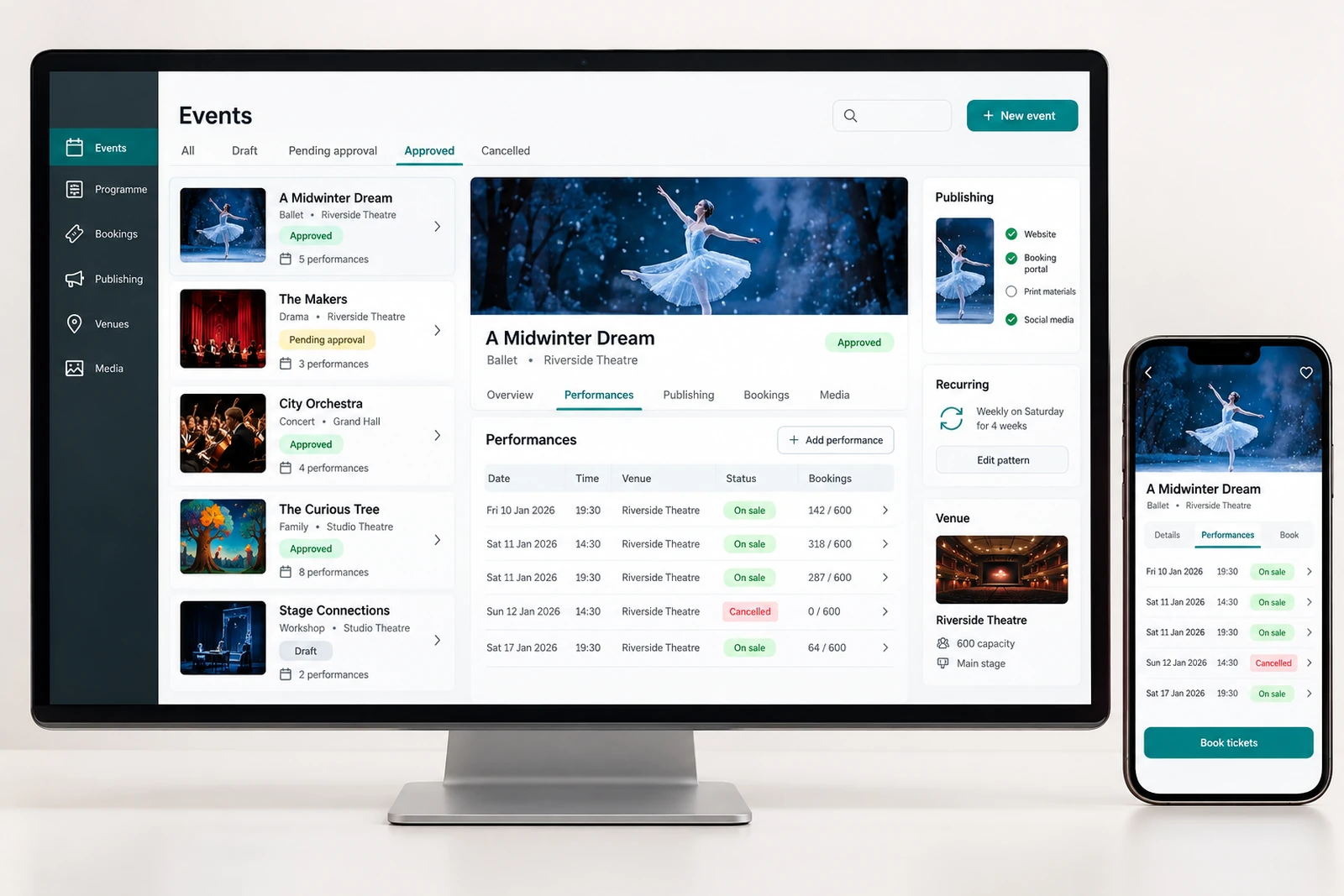
Arts & entertainment — Event and programme management interface concept

Event and programme management

The problem

A programme can appear complete in a spreadsheet while individual performances remain uncertain. One show has a confirmed venue but no approved start time; another has artist approval but no ticket-provider reference. If the public website treats every row as ready to publish, audiences receive information that the production team has not agreed. Staff then make corrections in several places and cannot easily explain who approved the original version.

What we can build

We can build a programme workspace with separate records for an event series and each performance. A record can hold the approved title, venue, date, timezone, booking reference and responsible organiser. Draft, awaiting approval, published, postponed and cancelled states make readiness visible. Instead of treating a calendar date as proof that a show is confirmed, publication can depend on the specific checks your organisation agrees.

Research context: Public event-planning software discussion. self-reported practitioner discussion.

An entertainment business manages more than a public event page. A performance can involve a venue, artists, technicians, promoters, suppliers, ticketing partners and audiences who need different information at different times. A change to the running order may affect rehearsals, transport, front-of-house instructions and the announcement on the website. When those records live in separate conversations, the team can spend its time checking which message is current instead of preparing the experience.

Heavenkeys can design websites, mobile experiences and operational software around those handoffs. The starting point is a specific problem: an unanswered refund enquiry, an outdated venue instruction, a crew member booked twice or an image that nobody can confirm is cleared for publication. We identify the people responsible, the records they use and the systems that already work. A focused connection or clearer interface may be more useful than replacing the ticketing platform or buying an entirely new management suite.

The public discussion linked in this guide provides an example of an organiser working across several separate tools. The solutions below are our proposed designs, developed from workflow analysis and practical questions a business can validate with its own staff. They are not claims about products already delivered, guaranteed savings or problems experienced by every arts organisation. A theatre, festival, touring company, museum and independent performer will need different priorities, permissions and operating procedures.
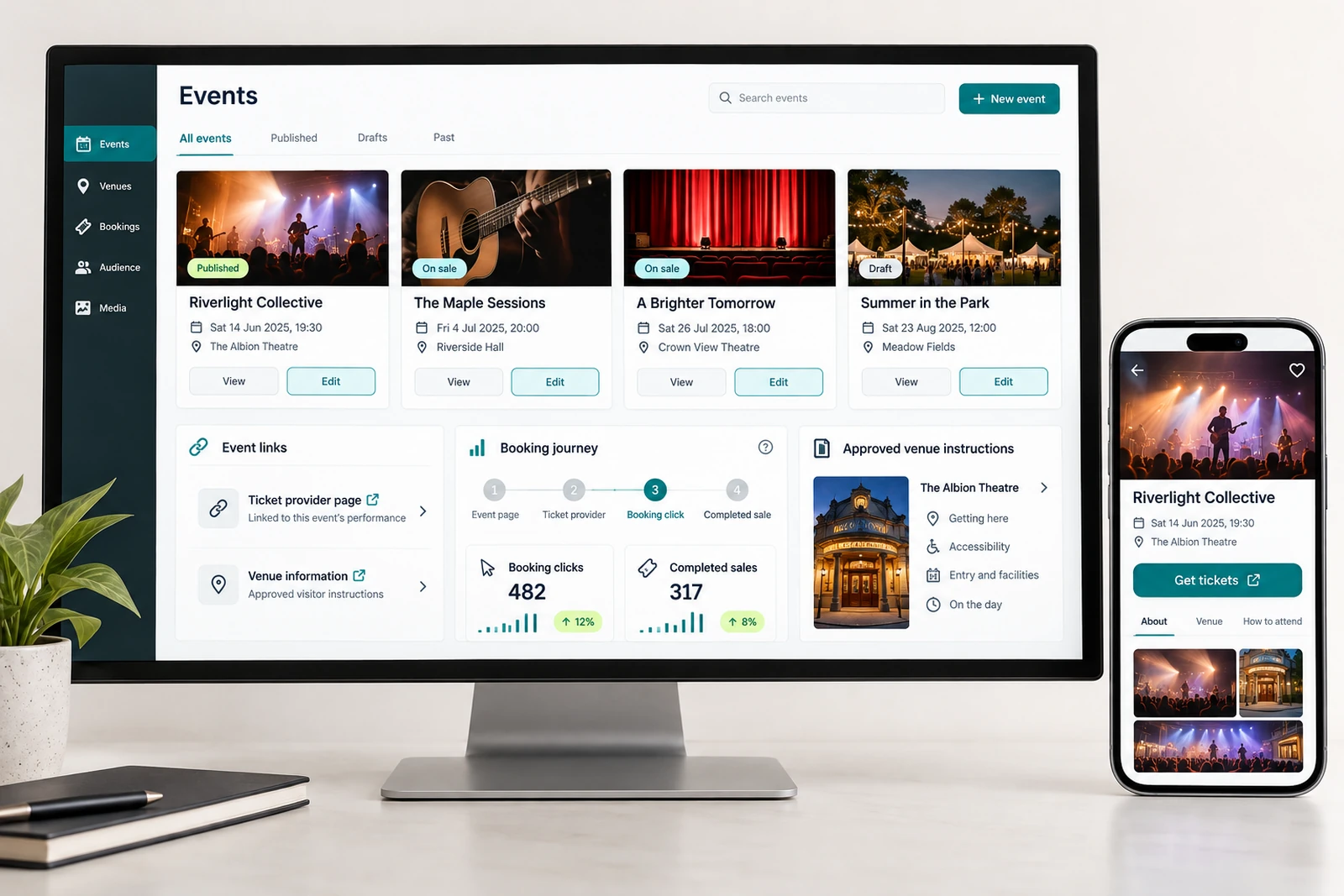
Arts & entertainment — Audience and booking journeys interface concept

Audience and booking journeys

The problem

A visitor may like an event but still struggle to buy the right ticket. A programme page can link to a general ticketing homepage, omit the date selection or use several different names for the same performance. On a phone, that extra search makes the visitor uncertain whether the ticket they found belongs to the show they were reading about. Staff receive questions that a clearer route could have answered.

What we can build

We can design an event-detail journey that carries the performance context into the booking step. The page can present the approved date, venue, age guidance, access information and a clearly labelled link to the correct ticket-provider record. Where the provider supports it, an integration can show current availability or a verified booking status. Where it does not, the page can explain the handoff instead of displaying an invented live count.

Research context: W3C WAI form notifications. primary accessibility guidance.

Entry scanning when connectivity fails

The problem

An entry queue can stop when the device cannot reach the ticketing service. Staff may have to choose between delaying attendees and admitting people without a reliable record. Multiple scanners introduce another uncertainty: an offline device may not know that a ticket has already been used at a different entrance. A smooth-looking scanning screen is insufficient if its confirmation does not reflect the system's actual knowledge.

What we can build

We can help design an entry workflow around the authorised ticketing provider's supported connectivity behaviour. Where offline validation is permitted, the interface can clearly show the age of its downloaded data and whether a scan is locally accepted or centrally confirmed. A supervisor view can identify unresolved synchronisation conflicts after connectivity returns. Where offline use is unsupported, the workflow needs an explicit fallback approved by the organiser.

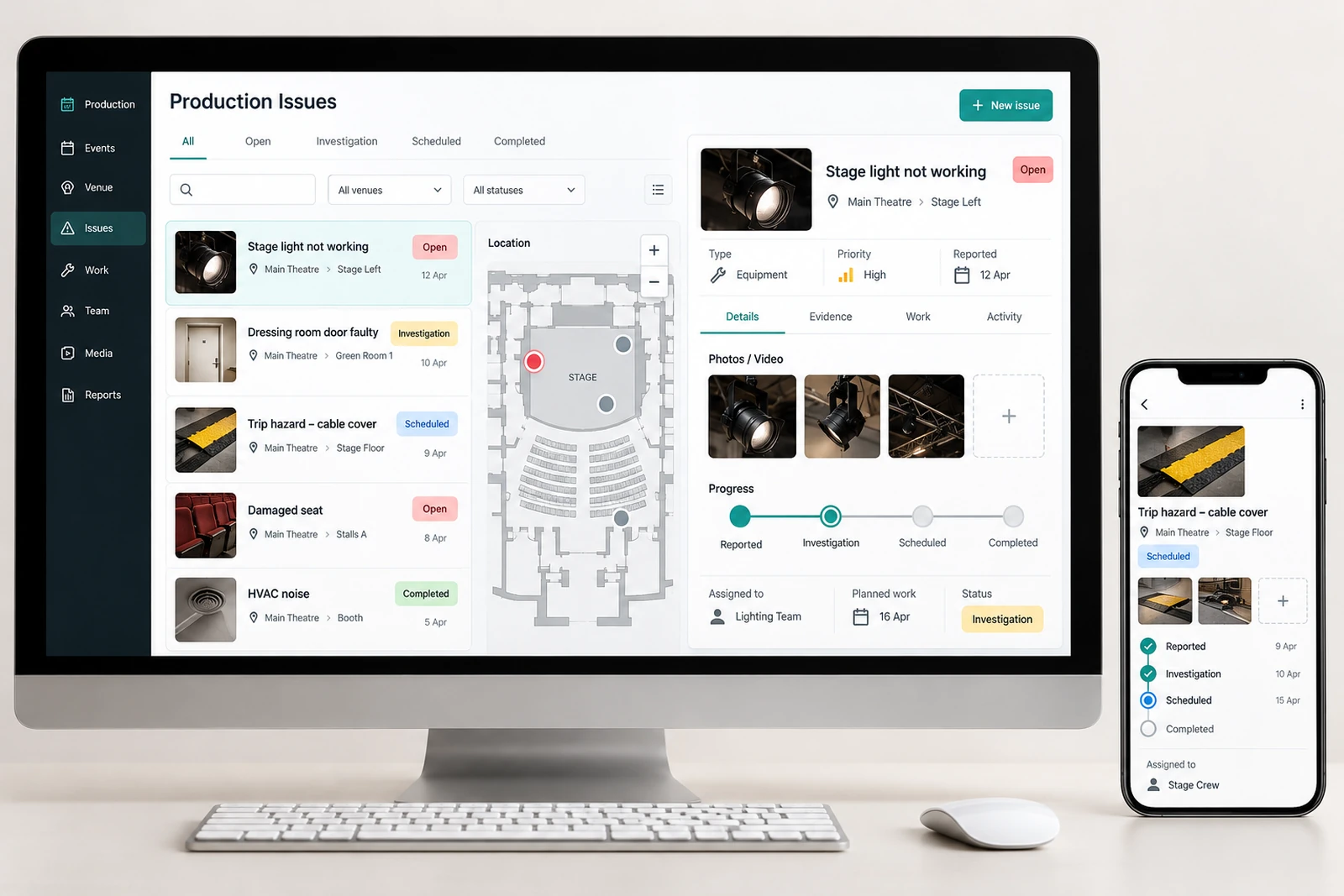
Arts & entertainment — Production issue tracking interface concept

Production issue tracking

The problem

A damaged cable, blocked loading route or missing piece of equipment can be reported in a group chat with no named owner. Someone may acknowledge the message without arranging the work. Later, another team member assumes the problem was fixed because the conversation has moved on. The production lead needs to distinguish an issue that was noticed, an action that was assigned and a resolution that was actually checked.

What we can build

We can build a production issue workspace that connects a report to an event, venue area or equipment record. Staff can describe what happened, attach permitted photos or video and identify who needs to assess it. Review, assigned, scheduled, in progress and resolved states give the team a common view. Your organisation sets the urgency rules and the escalation contacts; the software should support those procedures without replacing emergency communication.

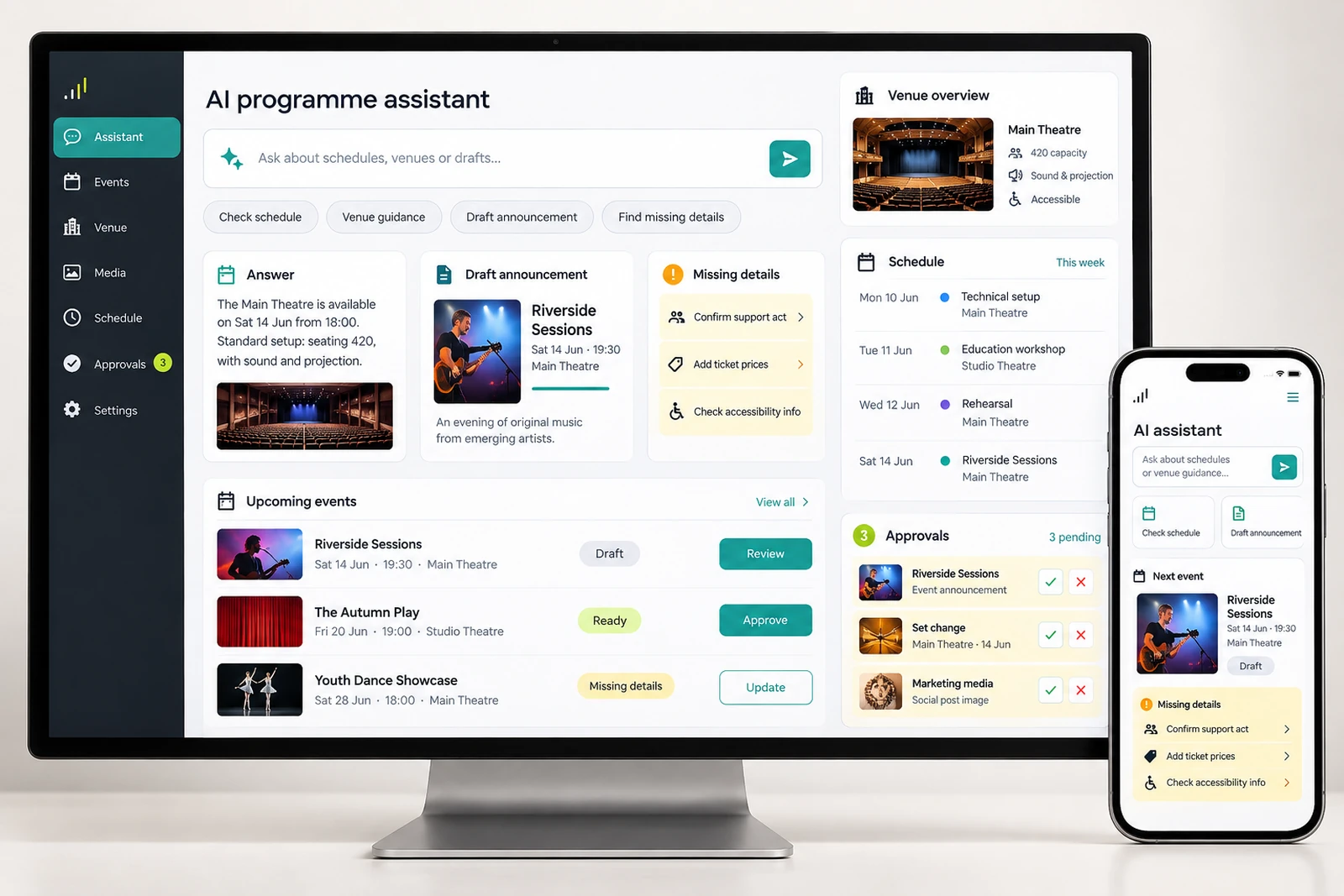
Arts & entertainment — AI programme assistant interface concept

AI programme assistant

The problem

Audience questions often arrive in short, incomplete messages: which entrance to use, whether a performance has changed or where to find the right ticket. Staff can answer these repeatedly while also preparing the event. A general chatbot can make the situation worse if it improvises a venue policy, quotes an old schedule or answers confidently when the organiser has not published the information.

What we can build

We can scope an assistant that retrieves approved programme and venue information, identifies the relevant performance and gives a source-linked answer. Its knowledge can be restricted to records the organiser has authorised. When a question concerns an unpublished change, a disputed purchase or an individual access arrangement, the assistant can collect the minimum useful context and pass it to the appropriate staff queue instead of inventing a decision.

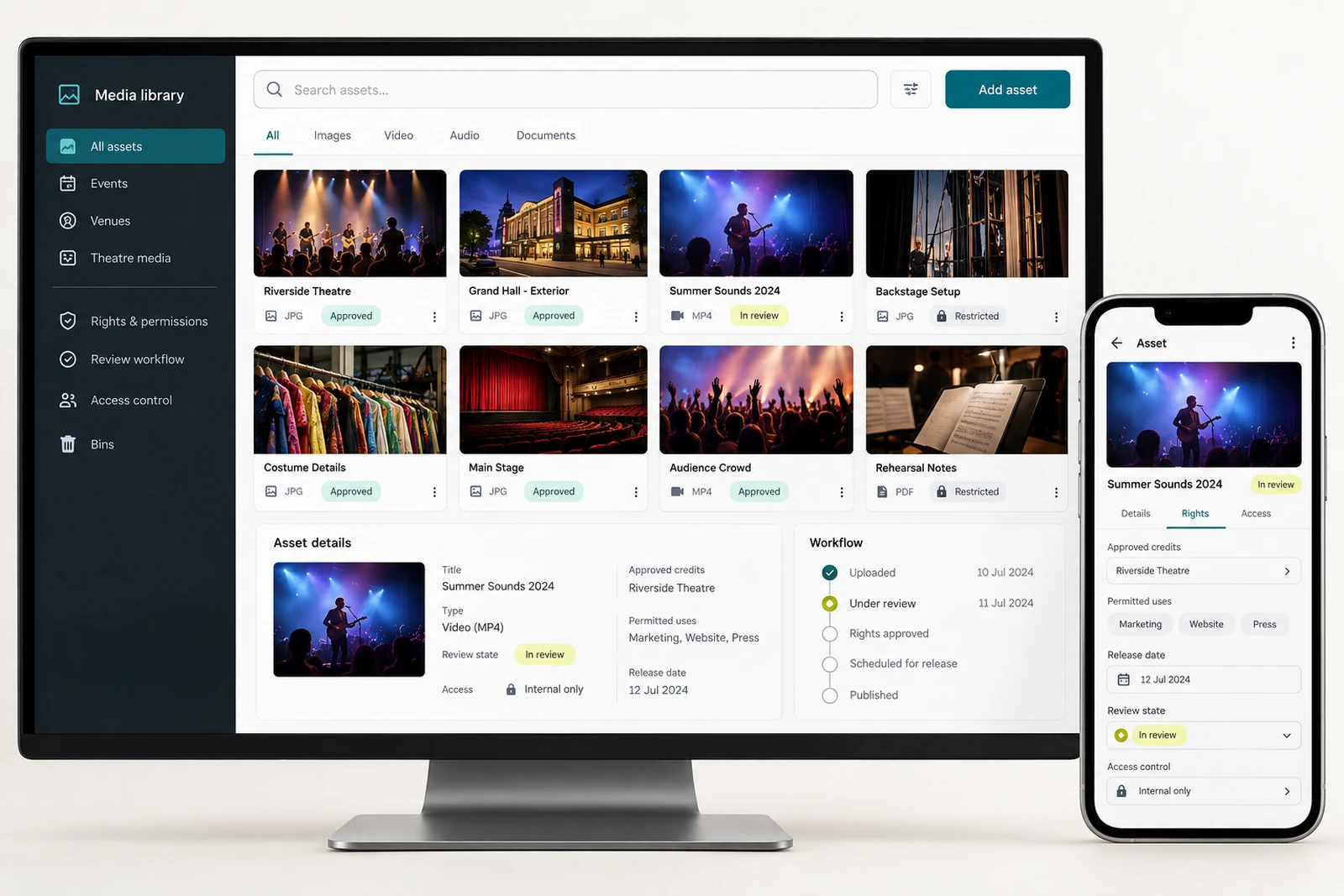
Arts & entertainment — Media library and rights workflow interface concept

Media library and rights workflow

The problem

Promotional assets can spread across shared drives, personal folders and email attachments. A publisher finds a strong performance photo but cannot tell whether it is cleared for a paid campaign, which credit line belongs to it or whether an artist has approved that version. When several similar exports exist, staff may choose the newest file even though its permitted use differs from an earlier approved asset.

What we can build

We can build a media library that records asset versions, credits, approved uses, release windows and review status. Images, trailers, posters and captions can be linked to the event or artist they concern. Search can use useful descriptions and campaign associations rather than file names alone. The library can show the permission record alongside a preview so staff understand why an asset is available for a particular purpose.

Arts & entertainment — Organiser reporting interface concept

Organiser reporting

The problem

The organiser can receive several impressive-looking reports without knowing what requires attention today. A ticketing report counts sales, a marketing report counts clicks and a production sheet lists tasks, but none identifies the event whose venue approval is missing. Combining totals without their definitions can also create a false picture: reservations may be counted as paid tickets, and clicks may be presented as attendance.

What we can build

We can design an organiser dashboard around decisions rather than decorative charts. Each event can show readiness, overdue approvals, unresolved audience enquiries and the status of authorised provider connections. Financial or booking summaries should carry the source, reporting period and last successful update. A manager can move from an exception to the record and responsible person instead of opening another unrelated spreadsheet.

Arts & entertainment — Crew scheduling and task ownership interface concept

Crew scheduling and task ownership

The problem

A call sheet can list enough people while still leaving a critical role uncovered. Availability, requested shifts and confirmed assignments may be recorded in different messages. A change to setup time can affect an entire crew, but the revised document may not reach everyone. A name on a spreadsheet also does not tell the production lead whether that person accepted the assignment or has the required preparation.

What we can build

We can build a crew coordination workspace with roles, availability, assignments and acknowledgements. A requested shift remains distinct from a confirmed booking. Tasks can identify the responsible lead and any prerequisite, such as an induction or approved qualification record. Changes to a call time can create a reviewable notification list and show which crew members still need to acknowledge the update.

Arts & entertainment — Equipment and asset bookings interface concept

Equipment and asset bookings

The problem

Two productions may reserve the same equipment because its availability is tracked through informal conversations. A kit can also appear available even though it is awaiting inspection, missing a component or travelling back from another venue. The resulting issue is not just a booking conflict: staff need to know whether the complete, usable asset can be delivered in time for the next setup.

What we can build

We can create an equipment register that separates the asset's condition, location and reservation status. Bookings can include preparation, transport, use and return windows rather than just performance dates. A kit record can identify its components and link maintenance history. Staff can review clashes and unavailable items before committing them to a production, with substitutions subject to the appropriate technical approval.

Arts & entertainment — Sponsor and partner deliverables interface concept

Sponsor and partner deliverables

The problem

A sponsor agreement may promise a logo placement, stage acknowledgement, guest allocation and a post-event report. Those commitments often belong to different teams, so the partnership lead cannot tell which are ready. A logo can be published in the wrong version, an approval can arrive after a print deadline or a report can include activity that nobody has checked against the agreement.

What we can build

We can build a partner-deliverable tracker that connects each approved commitment to an owner, due date, asset and completion evidence. The workspace can separate contractual requirements from proposed extras. A sponsor sees only the materials and approvals intended for that relationship. Internal notes, pricing and unrelated partner records remain restricted, while the delivery team can see exactly what needs to happen.

Arts & entertainment — Event feedback and follow-up interface concept

Event feedback and follow-up

The problem

Post-event feedback can combine a lighting fault, a ticket complaint and a suggestion for next year's programme in the same inbox. Staff may respond to the loudest message first while a recurring accessibility problem remains unassigned. A general satisfaction score gives little help if the business cannot connect comments to the performance, venue or stage of the audience journey concerned.

What we can build

We can create a feedback intake and review process that asks for the minimum useful context, links the message to an event and routes it to the appropriate team. Different queues can handle operational issues, customer-service requests and programme suggestions. Patterns can be reviewed across events without exposing individual audience details unnecessarily. Staff retain control over replies and any promised remedy.

Research and useful references

Reviewed October 9, 2026. Public discussions are self-reported examples, not representative surveys. The proposed workflows above are Heavenkeys design analysis and need validation against your business.

  • Public event-planning software discussion

    An event planner describes separate spreadsheets, exhibitor forms, ticketing services and mailing tools. This illustrates a fragmented workflow; it does not establish its prevalence or prove that a custom platform is the right answer for every organiser.

  • Eventbrite online event access guidance

    Provider guidance illustrates that online-event access has its own joining steps. The actual provider and purchase-to-viewing journey must be checked for each implementation.

  • W3C WAI form notifications

    Clear success and error feedback helps people understand whether a form was submitted and how to correct a problem.

  • Theatre technician discussion of advance schedules

    A technician describes difficulty planning rotas when incoming production information arrives late. This is an anecdotal discovery prompt, not a measure of industry-wide staffing problems.

Related services: Website design and development · Custom software · Film production

Performance rehearsal and production equipment in a theatre

Publish events, creative work, schedules and visitor information.
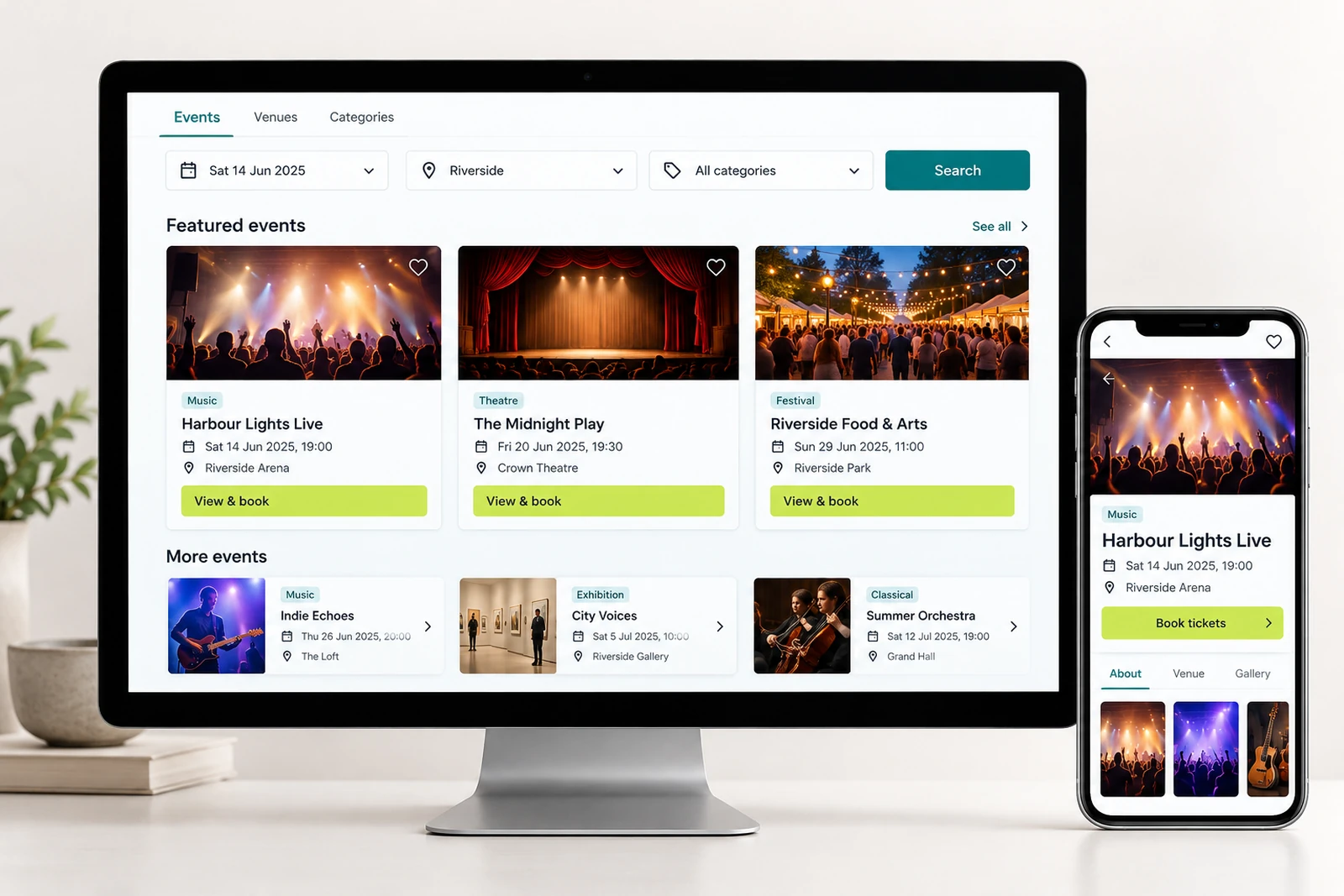
Arts & entertainment — Event discovery interface concept

Event discovery

Let visitors browse events by date, location or category and find booking information.
Event pages need a date, venue, booking route and current status. We plan expired and cancelled events as well as upcoming ones. Visitors should be able to distinguish an announcement from an event that has tickets available through the selected booking provider.

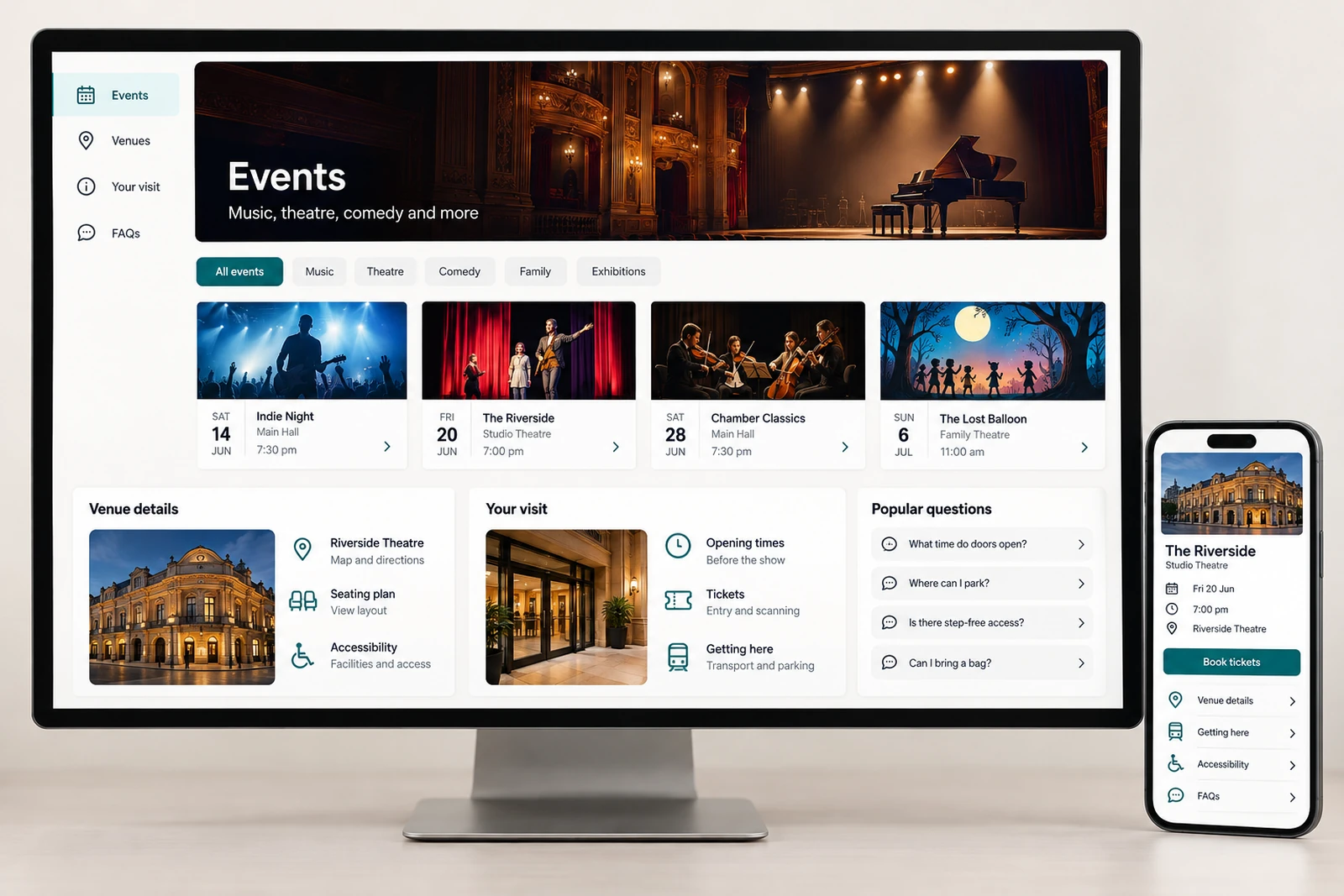
Arts & entertainment — Audience information interface concept

Audience information

Present schedules, venue details, access information and answers to common visitor questions.
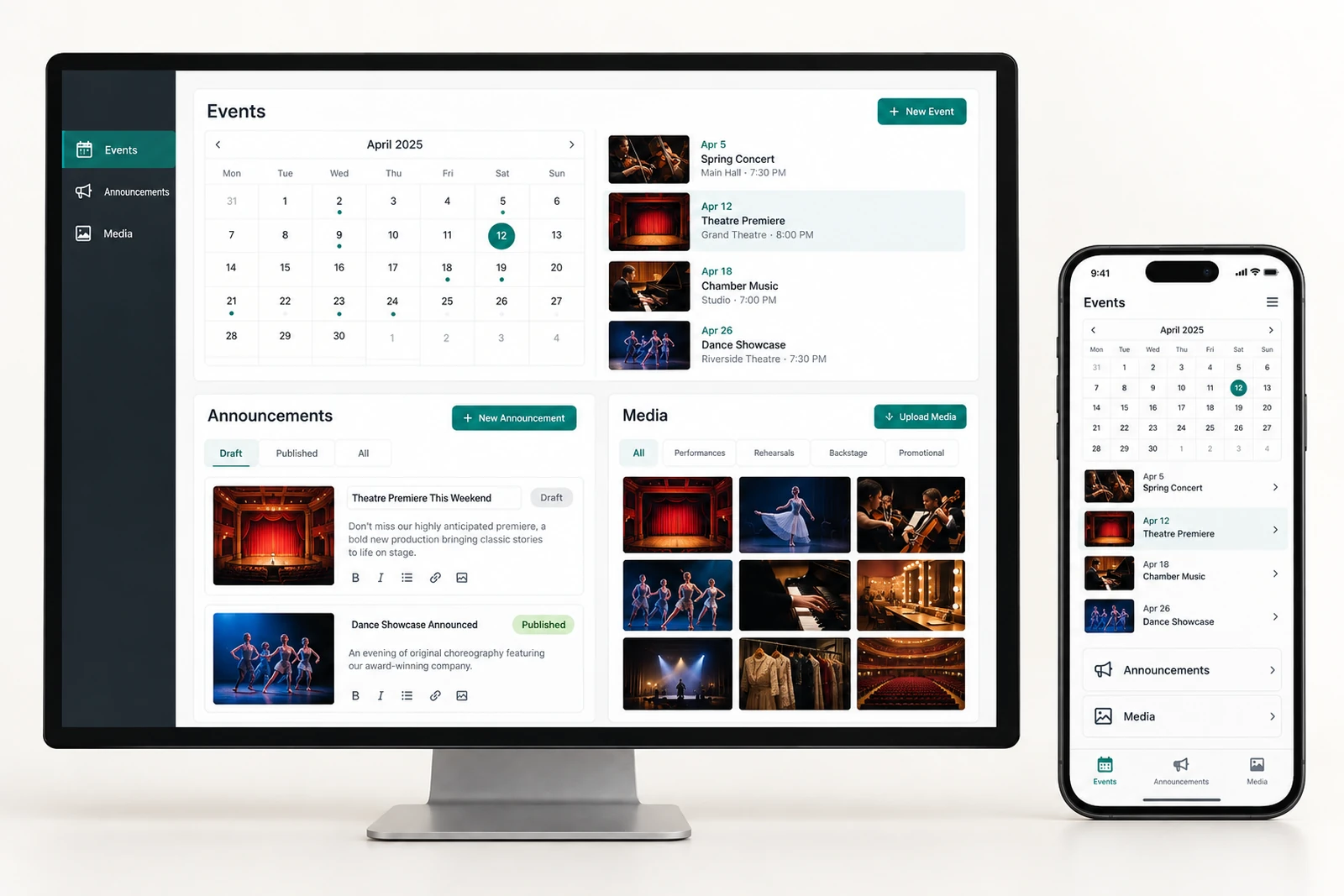
Practical audience information can reduce uncertainty before a visit. Directions, access arrangements, age restrictions and schedule changes need an owner who can approve them. The website should link to the actual venue or organiser information rather than making assumptions about facilities.

Arts & entertainment — Content publishing interface concept

Content publishing

Give your team a way to maintain event listings, announcements and media.

Publishing tools should accommodate recurring events and last-minute changes without duplicating every page. We review image permissions, performer credits and announcements with your team. A preview and approval step helps staff check a change before it becomes public.

Planning and delivery

A clear route from requirements to release.

Understand
We discuss your users, requirements and constraints, then agree on the scope.
Design
We map the main tasks and use prototypes to review the screens and flow.
Develop
We build in stages, share working versions and test the agreed features.

GOOD QUESTIONS

Planning your arts & entertainment project.

Do we need to replace all our existing tools?

No. We review what you already use and look at whether integration, a focused improvement, or a new build is the best fit.

Can the project be delivered in stages?

Yes. We can organize the work around a first useful release and a prioritized list of later improvements.

How do you learn about our requirements?

We discuss your audience, everyday workflow, content, integrations, and constraints before proposing a solution.

Explore all industries · Explore our services

Discuss your project ↗